¶ Replacing Filament
Follow the steps below to unload the current filament and load a new one.
¶ Step 1: Unload the Current Filament
- Tap the Unload button on the touchscreen.
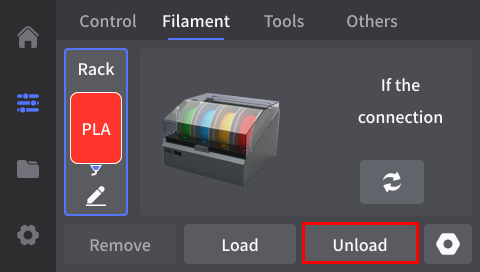
- Wait for the nozzle to heat up. The printer will cut and unload the filament automatically.
- When unloading is complete, remove the filament from the external feed port.
¶ Step 2: Load the New Filament
- Insert the new filament into the external feed port until it reaches the toolhead and can no longer be pushed further.
- Tap Load on the touchscreen.
- Wait for the nozzle to heat up, then gently push the filament inward until extrusion begins.
- Confirm that filament is loaded on the screen.